

What the checks mean
Every rule the checks use, in plain words, with why it matters and how to fix it.
The name in the first column is what hotdog-cms check prints. Use it with check.ignore in site.yaml to switch a rule off (rarely a good idea).
Links and pages
| Rule | Level | What it means, and the fix |
|---|---|---|
broken-link |
error | A link or picture points at something that isn't in your site. Fix the address, or add the missing page. If the page moved, add a redirect. |
missing-title |
error | A page has no title. Add title: to its front matter. |
missing-description |
warning | A page has no summary, so search engines make one up. Add summary:. |
description-length |
warning | The summary is longer than search results show (about 160 characters). Shorten it. |
duplicate-title, duplicate-description |
warning | Two pages look the same to a search engine. Give each its own title and summary. |
missing-canonical |
warning | A page doesn't say its own address. The template's pages always do; this comes up in layouts you've changed. |
noindex-in-sitemap |
error | The sitemap lists a page that asks search engines not to index it. |
robots-sitemap |
warning | robots.txt is missing, or doesn't point to the sitemap. |
Pictures
| Rule | Level | What it means, and the fix |
|---|---|---|
img-alt |
warning | A picture has no description. Add one: . Leave it empty () only for decoration. |
image-location |
error | A JPEG still holds the GPS location where it was taken: often someone's home. Upload it through the editor, which removes it, or share it from your photo app without location. |
image-weight |
warning | A picture is over 500 KB, which is slow on phones. Make it smaller, or upload it through the editor. |
social-image, social-image-alt |
warning (error if the picture is missing) | Link previews would have no picture, or no description of it. Set image: and image_alt:, or turn on cards: true in site.yaml for a generated one. |
Privacy
| Rule | Level | What it means, and the fix |
|---|---|---|
tracker-before-consent |
error | Statistics or tracking starts as the page opens, before anyone could agree. Use HotDog's own statistics settings, which ask first. |
analytics-ungated |
warning | Statistics are set to count without asking (gated: false). |
third-party |
warning | A page loads something from another website. If you meant to, list that site in check.allow_third_party, and it's added to your privacy page. |
privacy-page |
error | The site loads things from other websites but has no privacy page. |
privacy-contact |
warning | The privacy page has no email address to write to. Set privacy.contact. |
Safety
| Rule | Level | What it means, and the fix |
|---|---|---|
inline-script, inline-style |
warning (error with csp: strict) |
Code written straight into a page, which a strict security policy would block. Move it to a file in assets/. |
inline-handler |
error | onclick= and the like in a page. Move it to a script file. |
script-link |
error | A link that runs code (javascript:). Remove it. |
mixed-content |
error | Something loaded over plain http:// on a secure page. Use https://. |
forbidden-string |
error | Something matching your check.forbid patterns. Take it out. |
security-txt |
warning, error once expired | No /.well-known/security.txt, which tells people how to report a security problem. Add one: see below. |
cloudflare-email |
warning | With check.cloudflare: true: Cloudflare would turn email addresses into "[email protected]". Set markdown.email_off: true. |
Your look
| Rule | Level | What it means, and the fix |
|---|---|---|
look-contrast |
error | Two colors that must stay readable together, like text on its background, have a contrast under 4.5 to 1. Pick a darker or lighter color in Look. |
Adding security.txt
Make the file static/.well-known/security.txt:
Contact: mailto:security@example.org
Expires: 2027-10-01T00:00:00Z
Expires should be less than a year away. The check warns when it's within 30 days, and turns into an error once it has passed, so you're reminded to renew it.
The security policy your pages need
hotdog-cms check -csp also prints the Content-Security-Policy your pages need: a setting for your web server that stops anything you didn't put there from running on your site.
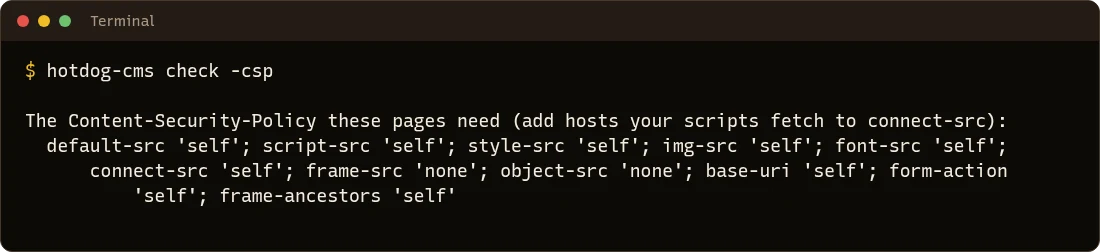
Give it to whoever runs your web server, or let the container publish target send it for you.