

How your site is served
You install HotDog on your own computer, not on your web server. Here's how the two fit together, and what each one does.
If you're coming from WordPress, this is the biggest difference: HotDog CMS goes on your own computer, not on the server that hosts your site. The server only needs a web server, which hands out files.
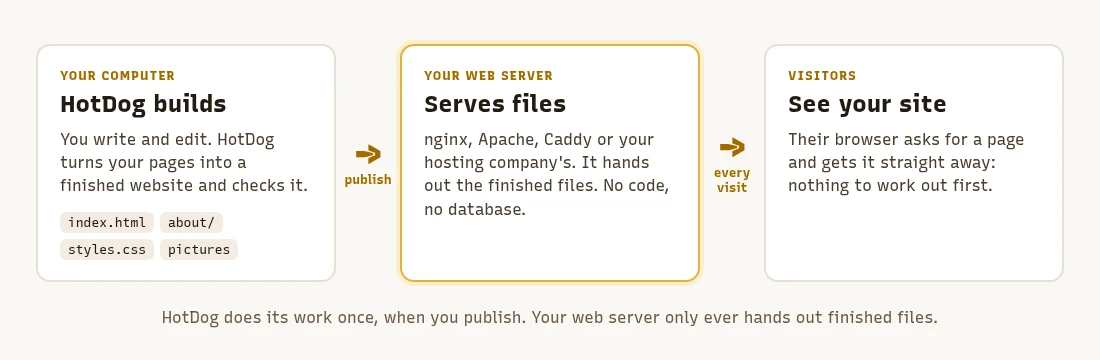
How it works
- On your computer, HotDog builds your site. It turns your pages and pictures into a finished website: plain HTML pages, stylesheets and pictures, in a folder called
public/. Then it checks it. - Publishing copies that folder to your web server. By hand, from your git platform, or with the server fetching it itself. Publishing goes through each way.
- Your web server hands those files to visitors. That's all it does. It doesn't need HotDog, code that runs on each visit, or a database.
How that's different from WordPress
WordPress builds every page while the visitor waits: PHP code runs, asks a database, and puts the page together. HotDog does that work once, when you publish, so visitors get pages that are already finished. That makes your site:
- fast, because there's nothing to work out on each visit;
- hard to break into, because there's no login page, plugin code or database on the server;
- cheap to host, because any hosting that serves files will do, even the smallest plan;
- low-maintenance, because the only thing on the server to keep updated is the web server itself.
What runs where
| Program | Where it runs | Do you need it? |
|---|---|---|
hotdog-cms, which builds, checks and publishes |
Your computer, or your git platform's pipeline | Yes |
| The editor | Your computer, or a separate server for a team. Never on the server that hosts your site. | If you want to edit in a browser |
| A web server | The server that hosts your site | Yes |
| The pull agent | The web server | If you want the server to publish changes itself |
| The forms endpoint | The web server, beside the site | Only if your site has forms |
hotdog-cms serve runs a small web server on your own computer, so you can preview the site while you work. For visitors, use a real web server.
Which web server?
Any web server that serves files will do:
- Hosting you already have, including shared hosting. Put the contents of
public/in the folder your host serves, often calledpublic_html, using your host's file manager or SFTP. If your host gives you SSH and rsync, you can publish over SSH instead. - A server of your own, such as a VPS or a computer at home, with nginx, Apache or Caddy.
- A container platform: HotDog can build the site as a container with its own web server inside.
What the web server needs to do
Out of the box, most web servers already serve a HotDog site. A few settings make it work better: showing your own "not found" page, letting browsers keep stylesheets and pictures, and serving calendar feeds properly. Web server settings has ready-to-use settings for nginx, Caddy and Apache, including shared hosting.
Your site also needs a certificate for https. Most hosting companies add one for you. On your own server, Caddy gets one by itself; for nginx or Apache, use Certbot.