

The import report
After every import, IMPORT-REPORT.md says what came across and what needs a look. Here's how to read it, and what to do about each kind of note.
Every import writes IMPORT-REPORT.md in your site's folder. It starts with a reminder that the importers are for moving content you own or have the rights to. Open it in any text editor:
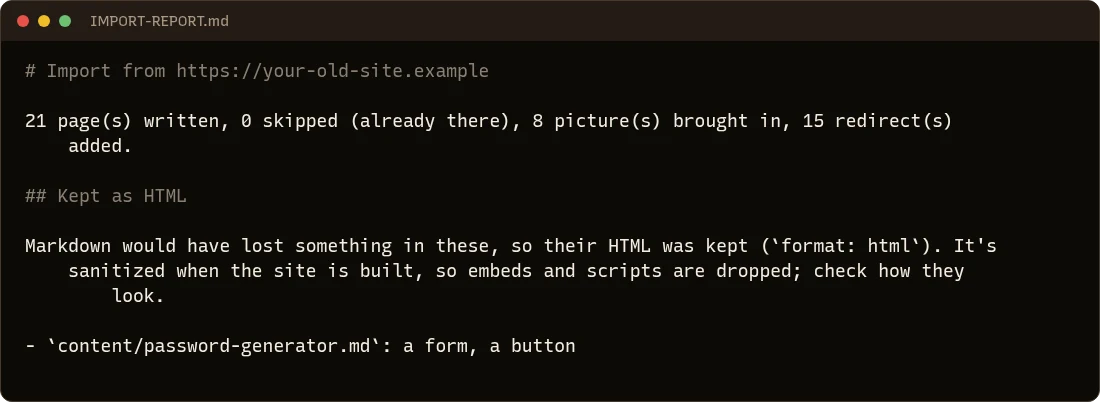
Kept as HTML
Most pages become clean Markdown. Some hold things Markdown can't: a form, an embedded video, a page-builder layout, a table with merged cells, colors set by hand. Those pages keep their HTML (their front matter says format: html), so nothing is lost, and the report says why, for each one.
What to do:
- Open the page in your browser (
hotdog-cms serve) and see whether it looks right. - HotDog cleans kept HTML when it builds, so scripts and embeds are dropped. An embedded video or a form from a WordPress plugin won't work as it did. Replace a video with the template's video section, and a form with a HotDog form.
- If the page would be better as Markdown, rewrite it, and remove
format: html.
Notes
Things only the old site could run are left as text where they were, and listed: WordPress shortcodes like [gallery] from an export file, Hugo shortcodes, Jekyll's Liquid tags. Find each in its page, and replace it with what it showed, such as the pictures from a gallery.
Pictures that couldn't be fetched
A picture that couldn't be downloaded (the old site is offline, the file is gone) keeps its old address, and the report lists it with the reason. Find the picture, put it in static/media/, and change the page to use it.
Redirects
The report counts the redirects added to site.yaml, one for every old address. You don't need to do anything: they make old links keep working.
Running it again
The import never overwrites a page that's already there, so you can run it again (after adding a password for drafts, say) and only new pages are written. Add -overwrite to replace pages you haven't changed yet.