

The site's folder
What each file and folder in your site is for, and which ones you'll actually touch.
A HotDog site is a folder of plain files. Here's the one the template gives you:
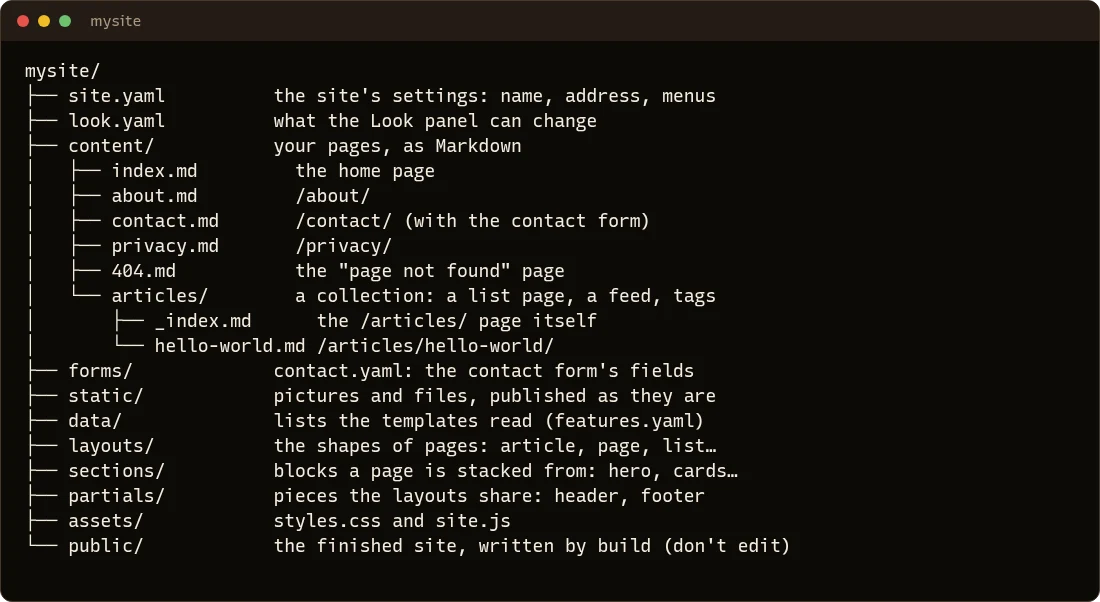
The parts you'll change
content/ holds your pages. Each Markdown file is one page, and its address on the site comes from where it is:
| File | Address |
|---|---|
content/index.md |
/ (the home page) |
content/about.md |
/about/ |
content/articles/hello-world.md |
/articles/hello-world/ |
A folder inside content/, like articles/, is a collection: HotDog makes a page listing everything in it, newest first, and can give it a news feed. See Pages and articles.
site.yaml holds the site's settings: its name and address, its menus, and much more. See Settings.
static/ holds pictures and other files. A file at static/media/logo.png is published at /media/logo.png. See Pictures.
forms/ holds forms, like the contact form. See Forms.
The parts that make the design
You can leave these alone until you want to change how the site looks. The editor's Look panel changes colors, fonts and the logo without touching them.
layouts/: the shapes of pages.base.htmlwraps every page with the header and footer;article.html,page.htmland the others fill in the middle.sections/: blocks you can stack on a page, like the big opening on the home page or a row of cards. See Sections.partials/: pieces the layouts share, like the header (nav.html) and the footer.assets/: the stylesheet and the little script that runs the light/dark switch. They're published with a code in their name, so browsers always get the newest version.look.yaml: what the editor's Look panel is allowed to change.data/: lists the templates read, such as the features on the home page.
The part HotDog writes
public/ is the finished site. hotdog-cms build writes it from everything above, and anything you change in it is replaced the next time. Publishing sends this folder to your web server. It's left out of git on purpose: it can always be rebuilt.
Other files
publish.example.yaml: an example of where to publish to. See Publishing.README.mdandLICENSE-starter.txt: notes about the template, and its license (MIT: the site is yours to use as you like).